The Containerlab primer left me with a useful warning: a running node says very little about whether traffic can use it. I wanted to move from link state into addressing and understand the decisions a host makes before a packet leaves an interface.
I knew what a /24 looked like, and I could add a default route when an exercise told me to. That was different from being able to explain why one address was local, another needed a router, and a third failed immediately with Network unreachable.
This lab made me prove each part.
Three links, three subnets
The topology was a four-node line:
host1 -------- srl1 -------- srl2 -------- host2
10.1.1.2       10.1.1.1      10.1.2.2      10.1.3.2
               10.1.2.1      10.1.3.1

     10.1.1.0/24    10.1.2.0/24    10.1.3.0/24
Each link had its own /24. Host1 and srl1 could communicate directly on 10.1.1.0/24; srl1 and srl2 shared 10.1.2.0/24; host2 reached srl2 on 10.1.3.0/24.
That was the first useful boundary. A node with interfaces in two subnets can route between them, but only when the packet reaches it and a usable route exists in both directions.
One template, different routers
The routers were configured with Ansible rather than a list of copied CLI sessions. The inventory named srl1 and srl2, and Ansible associated those names with matching files under host_vars.
For srl2, the device-specific data looked like this:
interfaces:
  - name: ethernet-1/1
    ipv4_address: 10.1.2.2/24
    description: Link to srl1
  - name: ethernet-1/2
    ipv4_address: 10.1.3.1/24
    description: Link to host2
The Jinja2 template supplied the repeated command structure:
{% for iface in interfaces %}
"set / interface {{ iface.name }} admin-state enable",
"set / interface {{ iface.name }} subinterface 0 admin-state enable",
"set / interface {{ iface.name }} subinterface 0 ipv4 admin-state enable",
"set / interface {{ iface.name }} subinterface 0 ipv4 address {{ iface.ipv4_address }}",
"set / network-instance default interface {{ iface.name }}.0",
{% endfor %}
The playbook rendered that template for each inventory host and sent the resulting SR Linux commands through the JSON-RPC API. There was no SSH loop and no terminal output to scrape. The template described the configuration pattern; each host-vars file supplied the values that differed.
I tested that separation by adding a loopback to srl1:
- name: lo0
  ipv4_address: 10.10.10.1/32
  description: Loopback for management
The template needed no change. Its existing loop rendered another interface block, and the playbook applied it.
Watching ARP fill in the missing detail
Before host1 had sent traffic to srl1, its ARP table was empty:
docker exec clab-ip-fundamentals-host1 arp -nI pinged the adjacent router interface and checked again:
docker exec clab-ip-fundamentals-host1 ping -c 3 10.1.1.1
docker exec clab-ip-fundamentals-host1 arp -n
The second lookup contained a mapping for 10.1.1.1. Host1 already knew the destination IP, but local delivery also needed the MAC address for the neighbouring interface. ARP supplied that mapping and cached it.
For remote traffic, host1 would not ARP for the remote destination. It would select a route, then use ARP for the local next-hop gateway instead.
Breaking the interface
The first fault was an administratively disabled interface on srl1:
ethernet-1/1 is down, reason port-admin-disabled
ethernet-1/1.0 is down, reason port-down
The container was healthy. The interface configuration still existed. Traffic failed because the port had been explicitly disabled, and its connected 10.1.1.0/24 route was no longer active.
Re-enabling the interface restored its operational state and the adjacent ping. It also gave me a more useful order for troubleshooting: check administrative state, operational state, addressing and the connected route before changing anything further away.
Making a familiar address remote
The subnet-mismatch exercise changed host1 from 10.1.1.2/24 to 10.1.1.200/30.
A /24 leaves eight host bits. A /30 leaves two:
32 total IPv4 bits - 30 network bits = 2 host bits
2^2 = 4 addresses
The /30 block was:
10.1.1.200  network
10.1.1.201  usable host
10.1.1.202  usable host
10.1.1.203  broadcast
The final octet had not become two bits wide. Six of its eight bits now belonged to the network prefix, leaving two for host values. From host1's new point of view, srl1 at 10.1.1.1 was no longer local.
That made the subnet mask feel less like notation and more like a decision. It determines whether the host tries to reach a destination directly or looks for a router.
Removing the first hop
The last fault removed host1's default route:
docker exec clab-ip-fundamentals-host1 ip route del defaultIts route table was reduced to one directly connected network:
10.1.1.0/24 dev eth1 scope link src 10.1.1.2Pinging 10.1.1.1 still worked because it matched that route. Pinging 10.1.2.1 failed immediately with Network unreachable. Host1 had no matching route and no default next hop, so there was nowhere to send the packet.
I restored the route explicitly:
docker exec clab-ip-fundamentals-host1 \
  ip route add default via 10.1.1.1 dev eth1
This did not give host1 a map of every remote network. It gave host1 one reachable first hop: srl1 at 10.1.1.1.
In this test, the destination 10.1.2.1 was another address owned by srl1, so the router accepted the ping and replied. If the destination had been another device, srl1 would have needed its own route to the next network. The reply path would also need to be valid. A default gateway gets the packet to its first router; it does not guarantee the rest of the path.
What I kept as evidence
I ran the supplied test suite after completing the exercises:
uv run --project ../../.. --group test pytest tests/ -v25 passed in 139.71sThe tests covered the four-node topology, pinned images, Ansible files, Jinja2 syntax, deployment state and adjacent connectivity. I also kept the manually rendered command list for srl2 rather than treating the successful playbook run as proof that I understood the template.
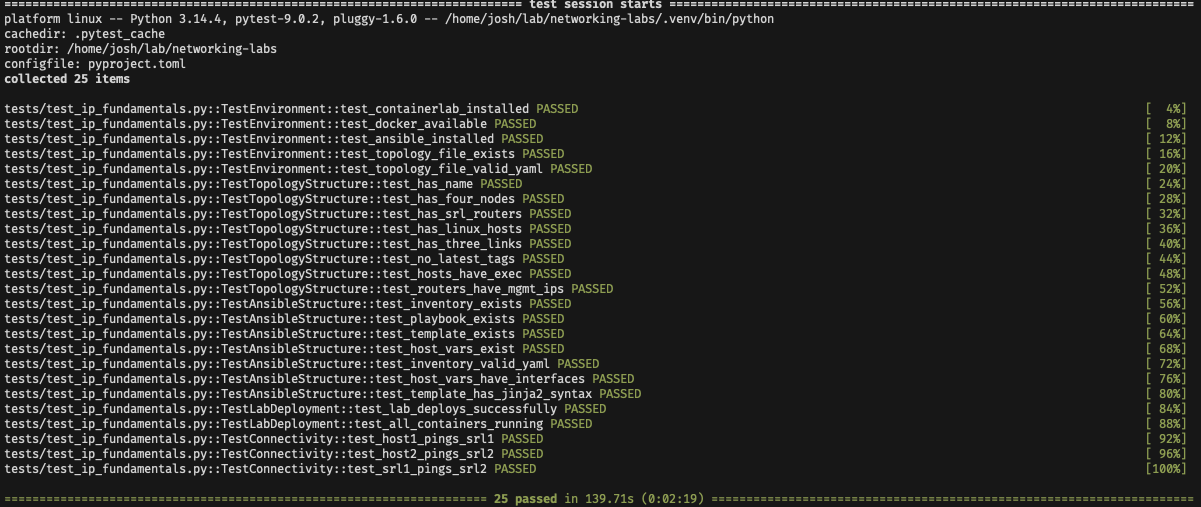
My full exercise record is in the IP Fundamentals evidence folder. The original material is available in the KubeCraft repository.
The main result was not memorising another ip route command. I can now look at an address and prefix, decide whether the destination is local, identify the next hop and ask whether the return path exists. That is a much better starting point for the routing lesson than another successful ping.